Author: RxDx

  • How I choose my programming languages and stack

    It depends. Some say programming is a tool, so no language fanboy is needed. I try to see the requirements and the context/scenario to evaluate the best option for each case. I start by asking some questions:

    • Where will it run? iOS, Android, Web, CLI, Embedded?
    • Does it need to sync and store data?
    • What API and dependencies does it require? GPS, maps, payments?
    • What are the expected DAU and the most common actions of this solution?
    • etc…

    It’s common that the app needs to sync data and clients access the content through the web (pc or mobile). When I’m not building the next Instagram replacement (with billions of accesses), I try to KISS. I give preference to full stack web frameworks where I can develop and deploy the backend (server) and the frontend (client) in the same code base. I’m also inclined to use more mature and battle tested frameworks over the newest and most hyped ones. After some playgrounds, my most loved full stack frameworks are:

    • Phoenix (Elixir)
    • Ruby on Rails (Ruby)
    • Django (Python)
    • Laravel (PHP)
    • NestJS (TypeScript)

    All of these tools (frameworks) can be used to create solid and robust solutions! Each one has its own peculiarities and strengths, but the overall way of how they work is the same.
  • My (Current) Home Server Hardware

    Beelink EQR6 Original specs

    • Processor: AMD Ryzen 5 6600H
    • RAM: 2 x 8 GB DDR5
    • Storage: 512 GB NVMe

    Upgrades

    • RAM: 2 x 32 GB DDR5
    • Storage: 2 x 1 TB NVMe RAID1

  • How I Self-Host

    It depends.

    Given the scenario: requirements and the constraints, there are some things that I self-host on my home server and other things that I self host on my Oracle free tier VPS. Each of them has its own pros and cons. In summary, my home server has a better hardware and the VPS has a better uptime (fewer network and power issues).

    Requirements

    • Run as many services as I want.

    Constraints

    • Hardware/Money

    To satisfy the requirements within these constraints, there are solutions to manage and deploy multiple containers on a single machine. You can read more about them in my previous post: Free Alternatives to Heroku, Vercel, Render and Fly: Dokku, CapRover, Coolify, Dokploy.

    If you read it, at the end, you would see that I use CapRover on my VPS and Coolify on my home server.

    One thing I didn’t mention in that post is that my Coolify instance runs on a Virtual Machine (VM) on top of Proxmox, which is a very cool Operating System (OS) that enables the creation and management of VMs and Linux Containers (LXCs).

    Summary

    • When I develop/test/learn/play with my side projects, that don’t need powerful hardware but require high availability, like Instats and mrkt, I deploy them using CapRover (or Dokku) on my Oracle free-tier VPS.
    • When I need more isolated environment and access to hardware resources, like HomeAssistant and Tibia Server, I create VMs inside the Proxmox running on my home server.
    • When I use third-party tools like Excalidraw, n8n and BentoPDF, I create Docker Compose files inside Coolify, which is running on my home server.

  • Things that I self host

    There are things that I self host. Some of them are hosted on my home sever in my room, like this site, and others are hosted on my Oracle free tier VPS.

    Here are the things hosted on my home server:

    Here are the things hosted on my VPS:

    • Instats: free Instagram not following back check
    • mrkt: free simple market platform

    Tip

  • Free Alternatives to Heroku, Vercel, Render and Fly: Dokku, CapRover, Coolify, Dokploy

    The long title is self-explanatory. For multiple reasons, we would like to have free and open alternatives to paid and closed services like Heroku, Vercel, Render and Fly. Dokku, CapRover, Coolify and Dokploy could be interesting options.

    I tested them on both: a Beelink EQR6 Home Server and an Oracle free tier VPS. I found that Dokku and CapRover are simpler and lightweight, making them a better fit to the free tier VPS. Coolify and Dokploy have more features, but they are heavier. With their admin interfaces, they are a good fit for the home server.

    Dokku

    • Simple, lightweight, no admin interface

    CapRover

    Coolify

    • Lots of features, heavier, includes an admin interface with templates

    Dokploy

    • Lots of features, heavier, includes an admin interface with templates

    Conclusion

    I choose CapRover to run on my Oracle free tier VPS and Coolify to run on my Beelink EQR6 Home Server.

  • This website is hosted in my room.

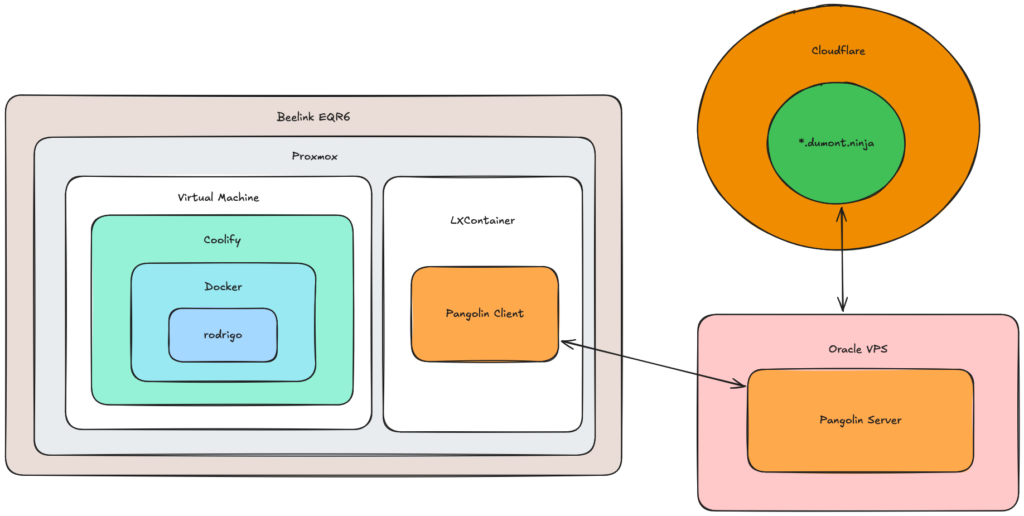
    This website is running in a WordPress CMS, that is running in a Docker Container, that is running in a Coolify platform, that is running in an Ubuntu Linux, that is running in a Virtual Machine, that is running in a Proxmox environment, that is running in a Beelink EQR6 mini computer, that also runs a LXContainer, that runs Ubuntu Linux, that runs Pangolin Client, that connects (full-duplex channel) with a Pangolin Server, that is running in an Ubuntu Linux, that is running in an Oracle VPS, that is routed by a Wildcard CNAME Record in Cloudflare DNS.

  • Why should I write this blog?

    Yo! I’d like to share my motivations of why I started this blog:

    • Learn!!!
    • Learn by documenting stuff
    • Learn by sharing my thoughts and knowledge
    • Learn and improve my English
    • Publish Own Site, Syndicate Elsewhere (POSSE)

  • Hello world!

    Welcome to Rodrigo Dumont.